What Is an AI SDR? How AI Sales Agents Work, and Why Bad Data Breaks Them 2026
Summarize with AI
|
Getting your Trinity Audio player ready...
|
Your AI SDR sent 2,000 emails before lunch. One congratulated a VP on a promotion she got three years ago. Another pitched a Salesforce add-on to a company that runs HubSpot. A third went to a prospect who unsubscribed last month.
The model wrote every email well. The data underneath was wrong.
Most AI SDR guides skip this part. They focus on 24/7 prospecting and a lower cost per meeting. This guide covers the basics first. Then it shows how one bad field moves through targeting, personalization, delivery, qualification and your CRM, and what an AI-ready data pipeline looks like.
An AI SDR (artificial intelligence sales development representative) is software that uses AI to automate or assist early-stage sales work. It researches prospects, prioritizes leads, writes outreach, replies to inquiries, qualifies interest and routes good opportunities to human sellers. Some AI SDRs only suggest actions. Others carry out approved workflows across your sales tools.
An AI SDR multiplies whatever data you give it. Feed it a messy CRM and it spreads the mess faster than any human could. Fix the data first, then expand autonomy only where accuracy is proven.
- Gmail now rejects non-compliant bulk mail. In November 2025, Google updated its sender guidelines FAQ to say enforcement is ramping up, and non-compliant messages now face temporary and permanent rejections, not just spam filtering.
- Outlook enforces too. Since May 5, 2025, Microsoft has rejected non-compliant bulk mail sent to Outlook.com, Hotmail.com and Live.com addresses.
- “Agent” labels have multiplied. More sales tools now market themselves as AI SDRs or agents, so verifying real autonomy and data controls matters more than ever.
What Is an AI SDR? The Definition, and What It Is Not
An AI SDR is a sales development system powered by AI. It is not a digital employee you can hire and forget. Most AI SDRs combine five parts, as IBM’s overview of AI SDRs also describes:
- Large language models (LLMs) that read context and draft messages
- Scoring logic that ranks and triages leads
- Data enrichment that fills gaps in contact and account records
- Integrations that sync with your CRM and calendar
- Rules that decide when a human must approve an action
What does SDR stand for?
SDR stands for sales development representative. A human SDR (also called a BDR, or business development representative) researches target accounts, starts conversations, qualifies interest and books meetings for account executives.
An AI SDR takes over some or all of that repeatable work. You will also see it called an AI SDR agent, AI sales agent, virtual SDR or digital SDR.
What an AI SDR can and cannot do
A well-set-up AI SDR can research accounts at volume, rank leads against your ideal customer profile (ICP), write personalized first drafts, follow up on its own, sort replies, book meetings and log activity in your CRM.
What it cannot do is replace strategic judgment, human accountability or clean data. It cannot navigate enterprise politics. It also cannot tell that a record is wrong unless something in your pipeline flags it.
AI SDR vs chatbot vs sales automation
The “AI SDR” label now covers tools with very different levels of autonomy. Judge a tool by what it does, not by what it is called.
| Technology | Typical job | What it does not necessarily do |
|---|---|---|
| Rules-based sales automation | Runs fixed email sequences and if/then rules | Understand complex replies or adapt |
| AI writing assistant | Drafts and rewrites outbound copy | Find, verify or route leads on its own |
| AI SDR (sales development agent) | Researches, qualifies, drafts, follows up, logs and sometimes books meetings within set permissions | Replace negotiation, accountability or clean data |
| Website AI chatbot | Answers visitors, captures leads, handles FAQs | Run outbound prospecting by default |
| Human SDR or BDR | Uses judgment, builds relationships, handles ambiguity | Match software speed on repetitive record work |
Five types of AI SDRs
- Outbound: finds in-ICP accounts and contacts, drafts personalized sequences and sorts replies.
- Inbound: engages website, form and chat leads, then qualifies and routes or schedules them quickly.
- Hybrid: combines inbound response and outbound prospecting, with more integration work.
- Copilot: suggests research, priorities and copy, while a human approves every send.
- Agentic or autonomous: runs multi-step workflows inside pre-approved tools, limits and policies.
One caution: a label does not prove autonomy. A product sold as an “autonomous agent” may just be a sequencer with a writing model attached. Ask the vendor to show exactly which actions run without human approval.
How Do AI Sales Agents Work? The 8-Step AI SDR Workflow
Every AI SDR runs some version of the same eight steps, from a simple copilot to a fully agentic system. The AI model only does the reasoning and writing in steps 5 and 6. The other six steps are data, rules and plumbing, and that is where most failures start.
- Define the ICP and permissions. Set sectors, regions, company size, buyer roles, account exclusions, suppression lists and outreach policies.
- Collect account and contact candidates. Pull from your CRM, inbound forms, lawful third-party B2B data sources, account research and first-party behavior.
- Resolve and validate identities. Confirm the right company and domain, the person-to-company match, the current role, email validity, duplicates, opt-out history, source and timestamp.
- Prioritize accounts and prospects. Score fit, engagement and intent with clear weights and disqualifiers. (For a practical model, see this fit and intent segmentation roadmap.) One vague website visit is not buying intent.
- Build grounded context. Give the agent approved product knowledge, verified account facts and traceable personalization evidence. Block anything unverified.
- Draft or choose an action. This could be an email, an approved social touch, an inbound reply, a CRM update or a handoff. A policy check confirms permission, timing and content first.
- Act and monitor. Send only when allowed. Sort replies (positive, negative, objection, unsubscribe, out of office, unclear) and enforce frequency caps.
- Route, log and learn. Book or suggest a meeting, pass the full conversation to the owner, and record the qualification reason, feedback, opt-outs and errors.
Where LLMs, enrichment, CRM integrations and policy engines fit
Think of an AI SDR as a pipeline, not a brain. The LLM sits in the middle. Many products ground it with retrieval-augmented generation (RAG), which pulls facts from approved sources before the model writes.
APIs and webhooks connect the agent to Salesforce, HubSpot or your sales engagement platform. Each stage should record timestamps, errors and a trace. That way you can still answer “why did the agent send that?” months later.
Inbound vs outbound AI SDRs
Inbound AI SDRs respond to people who already raised a hand, such as a demo request, a pricing-page chat or a webinar signup. Their main value is speed to lead, and their data risk sits mostly in routing and qualification.
Outbound AI SDRs start the conversation. They depend almost entirely on third-party contact data, enrichment and intent signals. Outbound is where bad data does the most damage, because there is no prior relationship to catch the error.
Why Bad Data Breaks AI SDRs: The Failure Chain
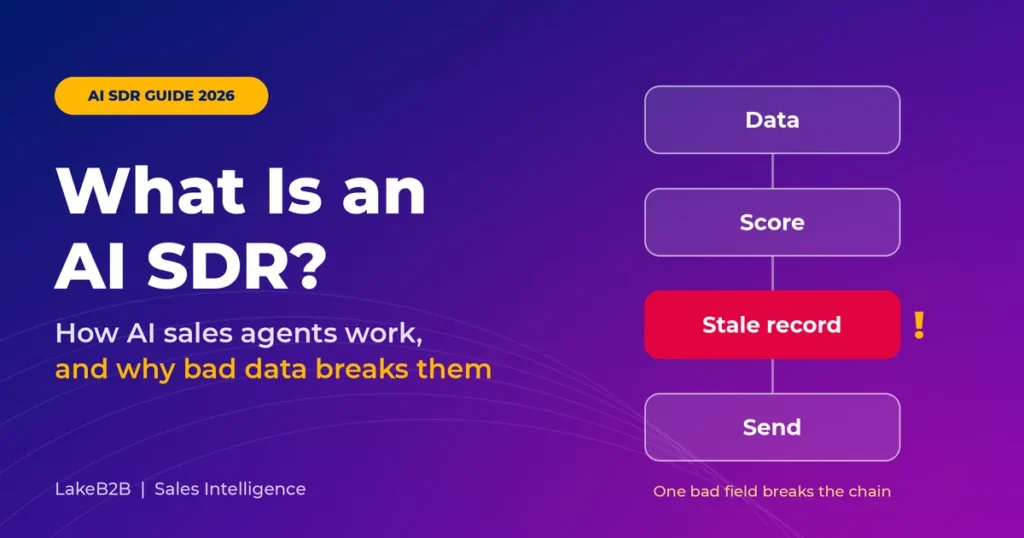
Bad data does more than lower an AI SDR’s hit rate. It starts a chain reaction, and each step makes the next one worse.
The last step is the dangerous one. When your reports run on the same broken records, the agent “learns” from bad outcomes and repeats them.
How one wrong field becomes a bad sales interaction
Take one stale job-title field. Your CRM says Priya is Director of IT at a logistics company. She left eight months ago.
- Targeting: she scores high on ICP fit, so the agent puts her near the top of the list.
- Personalization: the LLM writes a fluent, specific email about her “current” infrastructure project.
- Delivery: her old mailbox is closed, so the email hard-bounces and hurts your sender reputation.
- Qualification: her replacement never hears from you, so the account looks unresponsive.
- Feedback: the CRM marks the account as cold, and your scoring model quietly drops a company that may still be a good fit.
One field, five failures. A polished email built on a wrong fact does more damage than a plain email built on a right one. Language models improve fluency, not truthfulness.
The 10 data failures that break AI sales agents
| Data failure | What happens | What you see | How to control it |
|---|---|---|---|
| Stale employment or role | Agent uses an old job or title | “Congrats on the new role” to someone who left | Verify the person-company match and last-seen date |
| Invalid or risky email | Sequence goes to a dead or unreliable mailbox | Hard bounces, wasted credits, reputation risk | Verify before sending and suppress past bounces; never treat catch-all as confirmed |
| Duplicate contact or account | Parallel sequences and conflicting owners | Two agents email the same person | Unique IDs, deduplication and account-level send caps |
| Wrong firmographics | ICP scoring runs on old headcount or industry | Spend goes to unqualified accounts | Freshness windows and source priority rules |
| Wrong technographics | Agent assumes a tool the prospect does not use | False technology-based personalization | Record source confidence and observed date |
| False intent signal | A weak or account-level signal is read as personal interest | Creepy “saw you researching X” lines | Track where each signal came from and at what level |
| Missing consent or suppression | An opt-out is not synced across tools | Email sent after an unsubscribe | One central suppression check before every send |
| No source traceability | The model fills gaps in a partial profile | Invented funding rounds or initiatives | Evidence links and a ban on unsupported claims |
| Inconsistent CRM lifecycle | Qualified and unqualified statuses conflict | Bad routing and misleading pipeline | Field governance and stage validation |
| Wrong locale or time zone | Copy and send time do not fit the recipient | Compliance and experience problems | Validated country, territory and language fields |
Contact accuracy vs verified email vs deliverability
These three terms often get mixed up, and the confusion is costly:
Contact accuracy
The person really holds that role at that company today.
Verified email
The address passed syntax, domain, MX and mailbox checks.
Deliverability
Your message actually reaches the inbox. This depends on sender reputation, authentication and content.
No verification service can prove a real person will read your email. A “valid” label does not confirm an active person, a correct job title, permission to contact or inbox placement.
Example: 10,000 records do not equal 10,000 reachable buyers
This example is illustrative, not benchmark data. Start with 10,000 prospect records. Suppose 80% have the right company match, 85% have a current decision-maker role and 90% have a deliverable address.
If those errors were independent, only 6,120 records (10,000 × 0.80 × 0.85 × 0.90) would pass all three checks. The other 3,880 fail at least one. In real lists, errors tend to cluster: an old job usually means an old email too. So measure how many records pass every check on a real sample instead of relying on the formula.
The lesson for buyers is simple. “10,000 leads” and “10,000 usable, reachable contacts” are different assets. Judge any list or data provider by the share of records that pass every check at once, not by average field-level accuracy claims.
What Data Does an AI SDR Need? The Source-to-Send Gate Framework
An AI SDR needs five layers of data, and every fact needs a source and a timestamp. If you cannot say where a fact came from and when it was last checked, the agent should not use it in a sales email.
Contact, firmographic, technographic, intent and first-party data
If you want a deeper primer on each layer, start with this guide to what B2B data is and how its types fit together. Here is what each layer does for an AI SDR:
- Contact data: name, current role, current company, verified work email and region. This is the base of B2B contact data accuracy.
- Firmographics: industry, headcount, revenue band and location. These drive ICP scoring and routing.
- Technographics: the technologies an account appears to use. Useful for relevance, but risky when the signal is old or undated.
- Intent signals: research or content activity that suggests possible interest. Often probabilistic and account-level, so they do not prove a specific buyer is in market.
- First-party signals: your own website visits, product usage, form fills and past conversations. Usually the most reliable context you have.
Data freshness, provenance and permissions
B2B data decays all the time. People change jobs, companies rebrand and domains move. Strong AI SDR data quality rests on eight checks: accuracy, completeness, freshness, consistency, uniqueness, provenance (where it came from), permission and fitness for purpose.
Use this field contract as a starting point. The freshness guidance is a practical default, not a universal benchmark.
| Field | Validation check | When to refresh |
|---|---|---|
| Company name and domain | Confirm the correct name and a working domain | On a trigger event or major change |
| Contact name, role, current company | Cross-check a credible recent source; flag anything unclear | Before high-value outreach or after a job change |
| Work email | Syntax, domain and MX checks plus a trusted verifier; suppress past bounces | Before sending, based on age and risk |
| Country and region | Confirm where legal rules depend on it | When uncertain or changed |
| ICP attributes | Clear mapping plus source confidence | On a regular schedule and after account changes |
| Technographic signal | Source, detection method and observed date | Treat old or undated signals as low confidence |
| Intent or engagement | Signal type, identity level and time | Lower its weight as it ages |
| Suppression and opt-out | One central list, checked before every send | Real time or close to it |
| Personalization fact | Evidence link, confidence score and retrieval time | At writing time and again at send time |
The Source-to-Send Gate: a 7-step AI-ready data checklist
Run every record through these seven gates before you turn on autonomy. Each gate sits between the moment a fact enters your stack and the moment a message leaves it.
- Scope gate. Write down the ICP, exclusion rules, legal basis and allowed channels.
- System-of-record gate. Merge CRM and enrichment sources, and name one system of record for each field. If you are choosing an enrichment partner, this guide to choosing a B2B data enrichment service covers the evaluation criteria.
- Uniqueness gate. Standardize and deduplicate accounts, people and work emails.
- Validity gate. Confirm current employment, email risk and source freshness.
- Provenance gate. Attach a source and a
last_verified_attimestamp to every fact the agent may use. - Suppression gate. Sync opt-outs and past bounces to every sending and agent tool.
- Audit gate. Hand-check random samples of high-scoring and low-scoring records. Set pass/fail thresholds before you increase volume.
Give the agent hard stop rules too. It should not send when it finds any of these:
- A person-company match it cannot verify
- A suppression or earlier objection
- Unknown legal eligibility
- A strong conflict between facts
- A hard-bounced address
- A likely duplicate active sequence
- A personalization claim with no evidence
Before and after: without the gates, your SDR manager finds bad data through angry replies and a falling sender score. With them, bad records stop at gate 3, 4 or 6, and the agent only writes about facts it can trace.
AI SDR Email Deliverability and Compliance: What Still Applies
AI-generated or B2B email is not exempt from spam, privacy or sender rules. An AI SDR can burn a sending domain in weeks, and the legal responsibility stays with your company, not the vendor.
Gmail sender requirements
Google’s email sender guidelines apply to everyone who sends to personal Gmail accounts. Stricter rules apply to bulk senders, meaning those who send close to 5,000 or more messages a day to those accounts.
- All senders need SPF or DKIM authentication.
- Bulk senders need SPF, DKIM and DMARC, plus aligned domains, TLS, proper formatting and one-click unsubscribe.
- Spam rate: Google advises keeping the rate shown in Postmaster Tools below 0.10% and never reaching 0.30%.
These are Google’s stated guidelines, not a promise of inbox placement. They now have real teeth: since November 2025, Gmail has been ramping up enforcement, and mail that fails these requirements can be deferred or rejected outright. Microsoft applies similar rules to Outlook.com, Hotmail.com and Live.com, and has rejected non-compliant bulk mail since May 2025.
One detail B2B teams often miss: Google’s sender guidelines FAQ says these specific rules do not apply to Google Workspace (business) accounts. That is not a free pass. Corporate spam filters, Microsoft’s sender rules and recipient complaints still decide whether your AI outreach lands. Treat SPF, DKIM and DMARC as the minimum for every domain an AI SDR sends from.
CAN-SPAM and AI cold email in the US
The FTC’s CAN-SPAM compliance guide states that the law covers commercial B2B email, not just consumer promotions. Its core rules include:
- Truthful header information and subject lines
- Clear identification of the message as an ad where required
- A valid physical postal address
- A working opt-out, honored within the required time frame
If a vendor or AI agent sends on your behalf, your company is still responsible. Check the live FTC page before you set internal policy, since guidance and penalty amounts can change.
GDPR and AI SDR outreach in the EU and UK
Having a lawful basis under GDPR does not automatically make an email program lawful. EU ePrivacy rules and national laws also govern direct marketing. Recipients can object at any time, and the rules vary by country and recipient type. Get legal advice for each market rather than assuming US rules apply everywhere. This article is not legal advice.
Deliverability metrics that matter
Track hard bounce rate, spam complaint rate, unsubscribes, authenticated send rate and reply quality. Open rates are now unreliable because of privacy protections and automatic image loading. Replies, held qualified meetings and opportunities tell you far more than opens.
AI SDR vs Human SDR: Who Should Own What
“AI SDR vs human SDR” is the wrong question. For most teams, the strongest setup is hybrid: AI handles research, drafting and triage, while humans own sensitive accounts, unclear replies and the handoff. Whether hybrid beats your current process is something to prove with a pilot, not assume.
| Dimension | AI SDR | Human SDR | Rules-based sequence tool |
|---|---|---|---|
| Research at high volume | Fast, but only as good as its sources | Slower, with better judgment | Limited |
| Personalization | Scales grounded facts; can hallucinate | Nuanced and self-checking | Field and token swaps |
| Complex objections | Varies; needs escalation | Adapts well | Usually none |
| Enterprise relationships | Limited without oversight | Core strength | Not applicable |
| Consistency | High once rules are set | Varies by person | High |
| Data error risk | One error repeats at scale | Errors happen one at a time | Repeats bad fields mechanically |
| Compliance responsibility | Your company | Your company | Your company |
| Best use | High-volume, repeatable steps with clean data | Discovery, trust building, negotiation | Simple, fixed workflows |
Will AI replace SDRs?
AI will replace many SDR tasks, but not the need for SDR judgment. The repetitive work goes first: list building, first drafts, follow-up timing and CRM logging.
What stays is the work that needs a person. That includes reading an unclear “maybe next quarter,” reaching several people in a buying committee and deciding when not to send. Teams that redesign the SDR role around supervising agents will get more from both.
Traditional sequences vs AI SDRs
A traditional sequence sends the same steps to everyone and never improvises. That is limiting, but predictable. An AI SDR adapts to context and replies, which adds value and adds risk: factual errors, governance gaps and harder measurement. If your workflow is simple and your message is fixed, a sequence may still be the better tool.
Benefits, Limitations and Risks of AI SDRs
AI SDRs bring real gains in speed and coverage, but every gain depends on one condition. Each benefit below holds only when the inputs are accurate, current and permitted.
Benefits
- Speed to lead: inbound AI SDRs can answer form fills and chats within minutes, day or night.
- Coverage: an agent can research and rank far more accounts than a human team, so fewer good-fit accounts go untouched.
- Consistency: follow-up, logging and routing happen the same way every time.
- Human focus: SDRs and AEs spend more time in conversations and less time on CRM data entry.
- Personalization at scale: verified facts can be worked into outreach at a volume no human team could match.
Limitations
- Weak at nuanced objections, enterprise politics and deals with many stakeholders.
- Output quality is capped by data quality, grounding and integration depth.
- Autonomy claims vary widely, and many “agents” still need heavy human setup.
- Results are hard to measure honestly without a controlled baseline.
Risks
- Hallucinations: invented funding rounds, initiatives or quotes. Grounding, confidence thresholds, limits on claim types, structured outputs, fact-level citations and human escalation reduce this risk. They do not remove it.
- Spam: high volume plus weak targeting drives complaints and damages domain reputation.
- Suppression failures: an opt-out recorded in one tool but not another leads to repeat contact and legal exposure.
- Brand damage: people remember a creepy or wrong personalization line far longer than a good one.
- Misleading dashboards: booked meetings that never happen, or out-of-office replies counted as engagement, inflate apparent success.
AI SDR Tools in 2026: What to Compare Before You Buy
The best AI SDR tool is the one whose data, controls and handoffs hold up on your own test records, not the one at the top of a roundup. Ask every vendor to run the same test list, with duplicates, changed jobs, catch-all emails, unclear intent and an unsubscribe request built in, and compare what each one gets wrong.
The 2026 AI SDR landscape (illustrative, not a ranking)
Names that come up most often in AI SDR discussions include Salesforce (Agentforce), Qualified, 11x, AiSDR, Apollo and ZoomInfo. They are not interchangeable. Some are agentic conversation tools, some are CRM platforms with agent features, and some are data and engagement platforms. Check features directly before treating any two as substitutes.
| Vendor or category | What to examine | Question to ask |
|---|---|---|
| Salesforce AI SDR and agent features | CRM-native data and handoff workflows | Which actions are included in your edition, and which need add-ons or approvals? |
| Qualified | Inbound website conversations, qualification and meetings | What share of booked meetings are held and accepted by sales? |
| 11x | Outbound agent workflows and channel coverage | What account and region exclusions and quality controls exist? |
| AiSDR | Outbound research plus email and LinkedIn orchestration | How are source facts verified, and how fast do opt-outs sync? |
| Apollo | Contact database plus outbound workflows | How is contact freshness measured and sampled? |
| ZoomInfo | Contact, intent and data infrastructure plus sales workflows | What licensing terms, data-use limits and verification evidence apply? |
The same caution applies to AI SDR pricing. Costs vary widely and are often split across licenses, data credits, sending infrastructure, integrations and human oversight. Get live pricing from official pages or written quotes, and date it. Count setup, enrichment, verification, deliverability tools, support and QA time in your total cost of ownership.
AI SDR vendor evaluation scorecard
Score each vendor from 1 to 5 on each dimension, based on documented tests. Multiply each score by its weight and add up the results. The weights are a suggested starting point, not an industry standard, so adjust them to your sales motion.
| Evaluation dimension | Weight | Vendor A score (1 to 5) | Vendor B score (1 to 5) |
|---|---|---|---|
| Data coverage, accuracy, freshness and provenance | 25% | ||
| Governance: consent, suppression, approvals and audit trail | 20% | ||
| Reply handling, agent accuracy and human handoff | 15% | ||
| CRM and engagement integrations, field governance | 15% | ||
| Deliverability controls and sender health | 10% | ||
| Transparent outcomes and reporting | 10% | ||
| Total cost and contract flexibility | 5% |
Salesforce and HubSpot integration questions
Most AI SDR software advertises a Salesforce or HubSpot integration. Ask the vendor:
- Which objects sync, and which fields can the agent write to?
- How are duplicates and ownership conflicts handled?
- What API rate limits apply?
- Which subscription tier unlocks each feature?
AI SDR ROI: The Metrics That Actually Matter
Measure an AI SDR by pipeline, not volume. Your north-star metric is cost per held, sales-accepted qualified meeting, paired with pipeline generated. A booked meeting that never happens is not an opportunity, and emails sent is not a result.
| Metric | Formula | Common mistake |
|---|---|---|
| Usable-contact rate | Contacts that pass every check ÷ candidate contacts | Averaging separate check rates |
| Hard-bounce rate | Hard bounces ÷ sent messages | Mixing pre-send removals with sends |
| Positive-reply rate | Positive replies ÷ delivered messages | Counting out-of-office and false positives |
| Held qualified meeting rate | Held, sales-qualified meetings ÷ eligible contacts | Treating booked as held |
| Cost per held qualified meeting | Total program cost ÷ held qualified meetings | Leaving out human review, data and cleanup costs |
| Sales acceptance rate | Accepted meetings ÷ submitted meetings | No agreed acceptance criteria |
| Opportunity conversion | Accepted opportunities ÷ held qualified meetings | Measuring before the sales cycle plays out |
| Data defect rate | Sampled records with a critical defect ÷ sampled records | Not splitting results by source, ICP and record age |
| Agent factual-error rate | Audited messages with wrong or unsupported claims ÷ audited messages | No human reviewers or error categories |
| Opt-out sync time | Time from request to suppression in every system | Watching the average and ignoring the slowest cases |
Worked example (hypothetical)
These numbers are made up to show the math. Say your AI SDR program costs $8,000 a month, including the platform, data, deliverability tools, admin time and human QA.
- It produces 40 held qualified meetings, so each held meeting costs $200.
- Sales accepts 30 of them, so each accepted meeting costs about $267.
- Six accepted meetings become opportunities, so each opportunity costs about $1,333.
That is still not ROI. You can only call it return on investment once you measure added revenue or margin, attribution and the full sales cycle. A meeting forecast is not revenue.
How to run a fair AI SDR pilot
- Split similar in-ICP accounts into two random groups.
- Keep the ICP and the offer the same for both.
- Run your current process on group A and the AI-assisted or hybrid process on group B.
- Deduplicate so no account is contacted by both groups.
- Wait long enough for meetings to convert, report the uncertainty, and never declare a winner from a tiny sample.
How to Implement an AI SDR Without Hurting Data Quality: A 30-60-90 Day Plan
Roll out an AI SDR in three phases, and move forward only when the evidence supports it. An agent earns autonomy one action type at a time.
Days 1 to 30: Measure and set the gates
Audit CRM and contact-source errors by cohort. Document your ICP and suppression rules, map CRM fields and list exactly which actions the agent may take. Record your current hard bounces, replies and held meetings as a baseline. Confirm your legal basis and regional requirements.
Gate to move on: you know your current data defect rate, and you have a written list of allowed agent actions.
Days 31 to 60: Run a limited pilot
Start with a small, verified group of accounts. Let the agent draft messages and suggest next steps, while humans approve anything high-risk. Review factual accuracy, reply sorting, opt-outs and ownership clashes on a regular schedule, and log costs and incidents.
Gate to move on: factual errors, suppression failures and bounce rates stay within the limits you set in phase one.
Days 61 to 90: Expand selectively
Give the agent more autonomy only for actions with proven accuracy. Add confidence thresholds, test sets, exception queues and alerts. Compare held qualified meetings and pipeline against a similar baseline group.
Stop or roll back if complaints, factual errors, suppression failures or bounce rates rise noticeably.
Operating controls to keep in place
- Role-based tool access and action logs that cannot be edited
- Source timestamps and an approved list of data sources
- Account-level cooldowns, send caps and approval thresholds
- An emergency stop that halts all sending at once
- Data retention and deletion rules, a vendor data processing agreement (DPA) and audit trails
- Human ownership of legal review, deal commitments and escalations
AI SDR FAQs
What does AI SDR stand for?
AI SDR stands for artificial intelligence sales development representative. It is software that automates or assists the prospecting and early-funnel work a human SDR usually does.
Is an AI SDR the same as an AI sales agent?
Not quite. “AI sales agent” is the broader term and can cover any part of the sales cycle. An AI SDR focuses on prospecting, qualification and booking meetings.
Can AI SDRs replace human SDRs?
They can automate many individual tasks, but not every judgment call, relationship or point of accountability. Most teams get the best results from a hybrid model. A controlled pilot is the only way to know what works for your team.
What is the difference between inbound and outbound AI SDRs?
Inbound AI SDRs respond to people who have already shown interest, such as form fills and website chats. Outbound AI SDRs research and contact target accounts first.
Does an AI SDR need a database?
Yes. It needs accurate, current identities, ICP attributes, engagement history, source evidence, permission and suppression status, and CRM ownership data. Without them, it has nothing reliable to work with.
Why do AI SDRs fail?
The most common causes are stale or incorrect data, weak grounding, poor targeting, too much volume, too little human review, shallow integrations and metrics that reward activity instead of pipeline.
Does email verification guarantee delivery?
No. Address verification is separate from inbox placement, sender reputation, whether the recipient is active and whether you have permission to contact them.
Can AI SDRs send cold emails legally?
It depends on the country, the message and the recipient. In the US, CAN-SPAM applies to commercial B2B email. The EU and UK add further rules. Check with legal counsel for each market.
Can an AI SDR qualify leads?
Yes, within limits. It can apply frameworks such as BANT or MEDDICC to clear answers and route leads based on them. Unclear or high-value cases should still go to a human.
How much does an AI SDR cost?
Pricing varies widely. It usually includes separate charges for licenses, data, sending infrastructure, integrations and oversight. Rely on dated vendor quotes, not a single industry price.
How do you measure AI SDR ROI?
Track the extra held, sales-accepted qualified meetings and pipeline against total program cost. Watch bounce, complaint and factual-error rates alongside them.
What are technographic data and intent signals?
Technographic data shows which technologies a company appears to use. Intent signals suggest possible interest in a topic or product. Both are often probabilistic and account-level, so neither proves a specific buyer is ready to buy.
How often should prospect data be refreshed?
It depends on the field, the source and the risk. As a rule, recheck high-impact facts such as current employer, role and email before outreach whenever they are old or uncertain.
How do you prevent AI SDR hallucinations?
Ground the agent in trusted sources, set confidence thresholds, limit the kinds of claims it can make, require a source for every fact, test regularly and send unclear cases to a human. This reduces the risk but cannot remove it completely.
How do I choose an AI SDR?
Start with your data, not the demo. Shortlist tools that match your motion (inbound, outbound or both), test them on the same records, and weight data quality and governance above features.
Bottom Line: Better Inputs Before More Autonomy
An AI SDR is only as reliable as the data, context and permissions you give it. Better models make outreach faster and more convincing. They cannot turn stale job records, invalid addresses, weak intent signals or a missed unsubscribe into real pipeline.
In 2026, the smart question is not “how many emails can an AI SDR send?” It is “how many verified, relevant conversations turn into held, sales-accepted meetings without damaging trust?”
The Source-to-Send Gate makes that question answerable. Scope, system of record, uniqueness, validity, provenance, suppression and audit are not extra work on top of an AI SDR rollout. They are the rollout.
Your next step: pull 100 random records from the list your AI SDR will use first, and run each one through all seven gates by hand. The share that passes every gate is your real usable-contact rate. It will tell you more about your AI SDR’s future than any vendor demo.
How we researched and reviewed this guide
- Sources: vendor explainers on AI SDRs from Salesforce, IBM and Qualified; Google’s email sender guidelines and FAQ; Microsoft’s Outlook bulk sender requirements; and the FTC’s CAN-SPAM compliance guide. All were reviewed in October 2026.
- What we did not do: we did not independently test any AI SDR product. Vendor materials describe each vendor’s own advertised features, not verified results.
- Numbers: every calculation in this article is a labeled, hypothetical example that shows the math. None is an industry benchmark.
- Freshness: sender rules and AI SDR products change fast. We plan to review this guide every quarter; the next review is due in January 2027.
Table of Contents
Ready to turn insights into pipeline?
LakeB2B helps you find, enrich, and connect with verified B2B contacts using accurate data, intent signals, and audience intelligence so your sales and marketing teams can reach the right decision-makers with confidence.