How to Choose the Right B2B Data Enrichment Service
Summarize with AI
|
Getting your Trinity Audio player ready...
|
The demo goes well. The vendor shows a database with an enormous record count and a headline match rate that sounds too good to argue with. Six weeks after signing, your SDRs are bouncing emails, enterprise accounts are being routed to the SMB team, and nobody can tell you when half the job titles in your CRM were last checked.
Nothing in that demo was necessarily false. It just measured the wrong thing. A match tells you the provider found a record. It does not tell you the record is correct, current, or useful to the people who act on it. The right B2B data enrichment service is the one whose records come back correct, current, and usable when you test it on your own data.
Key Takeaway
Choose a B2B data enrichment service by testing it on your own records and measuring cost per accurate, usable record, not by comparing database size, headline match rates, or price per credit.
Match Rate Is Not Accuracy: The Usable Record Test for B2B Data Enrichment
The only number that matters in an enrichment evaluation is how many of your records come back correct, current, and ready to use. Everything else is a proxy.
B2B data enrichment is the process of adding missing, updated, or contextual information to the company and contact records you already hold. Salesforce describes it as improving existing data with information from a trusted external source so it becomes more complete, current, or useful. The definition is simple. The evaluation is where teams go wrong, because they collapse four separate questions into one.
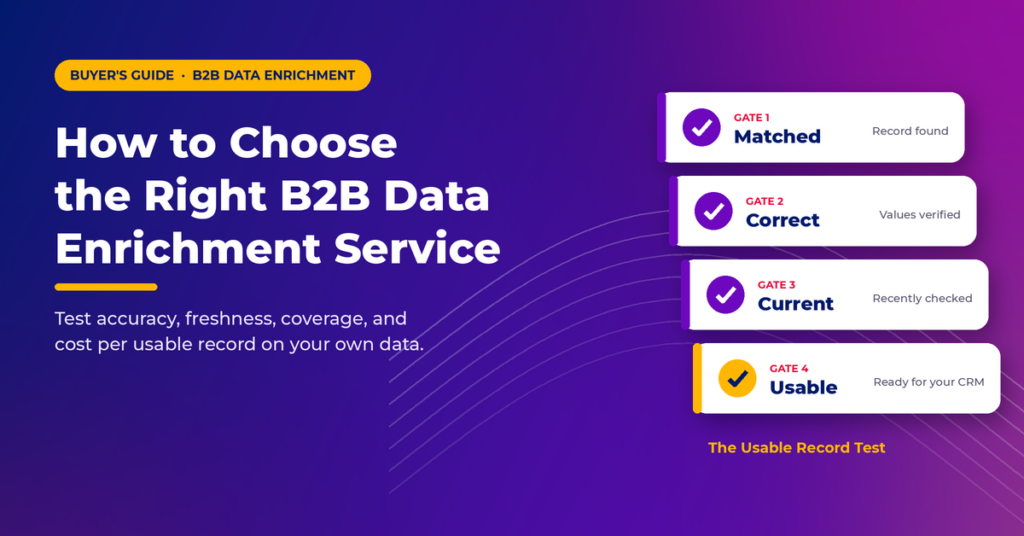
Use the Usable Record Test. Every enriched record has to pass four gates, in order:
- Matched. Did the provider find a corresponding record at all?
- Correct. Are the returned values actually right for this company or person?
- Current. Were those values verified recently enough to act on?
- Usable. Do the fields map cleanly into your CRM and change a real decision, such as scoring, routing, or segmentation?
Each gate filters out records. Submit 10,000 records, get 7,500 matches, and you have a 75 percent match rate. You do not yet know how many of those 7,500 have the right employee count, a valid work email, or a job title the contact still holds. A provider can post a high match rate and still return outdated or wrong information.
The Numbers: Demandbase’s 2026 comparison of enrichment tools specifically warns buyers against evaluating match-rate figures without an accompanying accuracy benchmark. Because this is a vendor-authored guide, the warning is more telling, not less.
The rest of this playbook is about measuring each gate on your own data rather than accepting a vendor’s aggregate number.
Define Your B2B Data Enrichment Requirements Before You Meet a Vendor
If you cannot write down which fields you need and what decision each one drives, you are not ready to compare providers. Vendors will happily fill the gap with their feature list.
Salesforce’s guidance on enrichment strategy recommends profiling your data before deciding whether enrichment is needed at all, and making provider selection evidence-based. In practice, that means answering eight questions internally first:
- What business problem are we solving: lead routing, ICP scoring, ABM targeting, outbound coverage, or CRM cleanup?
- Which records are in scope: new inbound leads, open opportunities, target accounts, or the full database?
- Which fields are required, and which are nice to have?
- Which countries and regions must perform well?
- What accuracy level is acceptable for each critical field?
- How fresh does the data need to be?
- Which systems must receive the data?
- What privacy and security requirements apply?
Know Which Type of Enrichment You Are Buying
Enrichment is not one product. Most providers are strong in some categories and thin in others, and pricing often differs by category. Enrichment is also not the same as appending, which fills in missing fields rather than adding depth. Our guide to data enrichment vs. data appending explains when you need each.
| Enrichment type | Typical fields | What it drives |
|---|---|---|
| Firmographic | Industry, employee count, revenue range, headquarters, ownership, funding | ICP segmentation, territory assignment, account prioritization |
| Contact | Name, title, seniority, department, work email, direct dial, location | Prospecting, outreach, personalization, lead routing |
| Technographic | CRM, marketing automation, cloud, analytics, security tools | Competitive displacement, integration targeting, partner plays |
| Intent and behavioral | Research activity, hiring, funding events, job changes, technology changes | Timing, prioritization, trigger-based campaigns |
| Corporate hierarchy | Parent and subsidiary links, branches, legal entities, registrations | Enterprise account planning, deduplication, ABM reporting |
Evaluate intent data separately from basic contact enrichment. It usually relies on different sources, different methods, and different update cycles, and each vendor may define “intent” differently.
Build a Required-Field Matrix
List every field you plan to buy, then add one column: the decision it changes. If a field does not improve scoring, change routing, sharpen segmentation, enable personalization, or improve account matching, drop it. More fields are not automatically better. Unused fields are just cost.
Decide Between One-Time and Continuous Enrichment
One-time enrichment suits CRM migrations, legacy list cleanup, and initial segmentation. Continuous enrichment suits new lead intake, job-change tracking, and ongoing account intelligence. Salesforce frames enrichment as either a one-time activity or an ongoing stewardship process, and HubSpot supports both automatic and continuous enrichment. Your answer changes which pricing model and integration method make sense, so settle it before you shortlist.
One more scoping decision: the market labels overlap. Data providers, enrichment APIs, CRM-native enrichment, waterfall or orchestration platforms, and full sales intelligence suites can all claim to “enrich.” Compare the workflow you need, not the category name on the website.
B2B Data Enrichment Provider Evaluation Criteria That Separate Vendors
Providers rarely differ on whether they have a feature. They differ on how well that feature performs for your markets, your records, and your stack. Evaluate each criterion against that standard.
Accuracy, Measured Field by Field
Accuracy is not one score. A provider can be excellent on company domains and weak on direct dials. Check correctness separately for company name, domain, employee count, industry, job title, work email, phone, the company-to-contact relationship, technology data, and location.
For email and phone, insist on three distinct terms. “Matched” means a value was found. “Verified” means the vendor checked it. “Deliverable” or “connectable” means it actually works. Vendors sometimes blur these, so ask which one their number describes. If your records are missing work emails entirely, email appending is the narrower fix to test first.
Match Rate, Broken Down
A single blended match rate hides the variance you care about. Ask for match rate by country, by company size, by industry, and by input type. A list keyed on domain will match very differently from a list keyed only on company name, and SMB records often behave differently from enterprise records.
Freshness and Verification Dates
B2B data decays constantly. People change jobs, companies change headcount, phone numbers change, and technology stacks change. Ask how often data is refreshed, whether enrichment is real-time, scheduled, or served from a static database, whether you can set refresh intervals, and, most importantly, whether each value carries a last-verified date. Without timestamps, you cannot identify stale records or refresh selectively.
Geographic Coverage You Can Prove
“Global database” is a marketing claim, not a coverage report. Performance can differ sharply between North America, the UK, DACH, the Nordics, APAC, India, the Middle East, Latin America, and Africa. LeadsterHub’s comparison of enrichment tools makes the same point, recommending that buyers test European and EMEA coverage explicitly where it matters.
Ask whether the provider uses local sources and business registries, supports local phone formats, and addresses local privacy rules. Then verify with your own records from each region.
Data Sources and Provenance
Ask where the data comes from and how it is verified. Common sources include company websites, business directories, government registries, partner and third-party databases, public professional profiles, technology detection, and human research. HubSpot, for example, states that its enrichment draws on its own commercial data, third-party providers, and publicly available information, with values scored against sources for accuracy and freshness. Demandbase describes a multi-source, triangulated approach.
Those are vendor descriptions, not independent audits. What you want to know is whether the provider can show a source and timestamp for a value, detect conflicting values across sources, and correct bad records when you report them.
Identity Resolution and Company Matching
Enrichment is only as good as the match behind it. Stronger matching combines identifiers: first name, last name, work email, and company domain together resolve identity far more reliably than a name alone. HubSpot’s documentation notes that it matches contacts on name and work email and companies on domain.
Company matching is where CRMs quietly get contaminated. Test whether the provider correctly separates parent companies, subsidiaries, branches, franchises, regional entities, and brands. A wrong parent-child link does not just break one record. It distorts every account rollup and ABM report built on top of it.
Integration Fit and API Quality
The integration method decides whether enrichment becomes part of your workflow or stays a quarterly CSV chore.
| Method | Best for |
|---|---|
| Native CRM or MAP integration | Fast setup, low maintenance, easier adoption for sales and marketing users |
| API | Real-time enrichment, custom workflows, product integrations, high volume |
| Webhooks | Event-driven flows, such as form submission to enrichment to scoring to routing |
| CSV upload | One-time cleanup, offline analysis, smaller operations |
| Automation platforms (Zapier, Make, n8n) | Connecting systems without heavy engineering |
If your team will call an API, check rate limits, batch and real-time endpoints, latency, error handling, retry behavior, documentation, SDKs, sandbox access, and usage monitoring. Ask what the API returns for an unmatched record, whether it flags partial matches, and whether it returns confidence scores and source information.
Hygiene: Deduplication and Normalization
Good enrichment should reduce mess, not add to it. Check whether the provider normalizes company names, job titles, countries, phone formats, industries, domains, and addresses, and whether its process avoids creating duplicates. HubSpot’s data quality tools, for instance, pair enrichment with duplicate management, formatting fixes, and enrichment coverage monitoring. If your CRM already carries heavy duplication or inconsistent formatting, run a data cleansing pass first so enrichment lands on clean records.
How to Run a B2B Data Enrichment Proof of Concept on Your Own Records
Your own database is the only benchmark that predicts how a provider will perform for you. A vendor’s published statistics describe their customers’ data, not yours.
Run the same controlled test across every shortlisted provider, ideally three to five of them:
- Define the use case in one sentence. For example: “Enrich existing B2B leads with verified work email, job title, employee count, industry, company domain, and technology stack.”
- Build a representative sample of 100 to 1,000 records. Mix industries, company sizes, and target countries. Include complete, partial, older, and newer records so the test reflects your real database.
- Seed it with records you already know are right. Include a set your team has recently verified by hand. These give you a built-in answer key for accuracy.
- Send the identical sample to every provider. Same records, same input fields, same instructions. Otherwise, you are comparing samples, not vendors.
- Track the same metrics for each. Match rate, field coverage, accuracy, freshness, missing values, duplicates, incorrect matches, processing time, and cost.
- Manually validate critical fields. Check a subset of emails, titles, and company links against trusted sources. This is tedious, and it is the step that exposes the difference between a matched record and a correct one.
- Push results into your real systems. Send the test output into your CRM or data pipeline to surface field-mapping problems, overwrites, and duplicate creation before they happen at scale.
Be honest about the limits. A few hundred records will not reveal every weakness, some vendors will resist sharing per-country numbers, and manual validation takes real hours from someone on your team. The test is still far cheaper than discovering the gaps after a twelve-month contract.
B2B Data Enrichment Pricing: Calculate Cost per Usable Record
Price per credit tells you what you pay. Cost per usable record tells you what you get. Only the second one belongs in a buying decision.
Know the Pricing Model You Are Signing
| Model | Works well when | Watch for |
|---|---|---|
| Subscription | You need predictable budgeting | Paying for capacity you do not use |
| Credit-based | Usage is steady and measurable | Different credit costs by field, expiry, failed-match charges |
| Pay-as-you-go | Workloads are variable or experimental | Costs becoming unpredictable at high volume |
| Per-seat | A small team uses the tool directly | Costs scaling fast across a large sales organization |
| Custom enterprise | You need volume, SLAs, multiple regions, or custom data | Contract minimums and complex terms |
For credit-based plans, ask five questions directly: Do credits expire? Do unused credits roll over? Are failed matches charged? Are email, phone, and intent fields priced separately? What happens to pricing at higher volumes?
Run the Math
The formula
Cost per usable record = total enrichment cost ÷ number of accurate, usable records
Here is an illustrative example: you submit 100,000 records, 70,000 match, and validation shows 60,000 are accurate and usable. If the total cost is $6,000, your effective cost is $6,000 ÷ 60,000, or $0.10 per usable record. A cheaper provider that matches more records but gets fewer of them right can easily cost more per record you can actually use.
Then add what the subscription price leaves out: API charges, verification fees, premium phone or intent data, integration and implementation work, engineering time, data cleaning, support tiers, and contract minimums.
There is a quieter cost lever too. Enriching the entire database by default often spends budget on inactive or irrelevant records. HubSpot’s data quality tooling lets teams enrich specific segments rather than everything. Enrich the records that feed a decision this quarter, not the ones that have not been touched in three years.
B2B Data Enrichment Compliance and Vendor Risk: Settle It Before Production
Compliance is not a vendor checkbox. It depends on your data, your jurisdictions, your purposes, and your contracts, so you own a share of it no matter who you buy from. HubSpot states plainly that its customers remain responsible for their own compliance, and that principle applies across the market.
GDPR
If you process personal data of people in the EU, the core GDPR principles apply: lawfulness, fairness and transparency, purpose limitation, data minimization, accuracy, storage limitation, integrity and confidentiality, and accountability. Individuals hold rights including access, rectification, erasure, restriction, portability, and objection. GDPR.eu offers a useful overview, though it is an informational resource, not legal advice.
CCPA and CPRA
The California Privacy Protection Agency lists consumer rights including the right to know, delete, correct, opt out of the sale or sharing of personal information, and limit certain uses of sensitive personal information. The law also includes purpose limitation and data minimization requirements for covered businesses.
What to Ask Every Vendor
- What is the legal basis for processing, and where does the data originate?
- Where is data stored, and how long is it retained?
- Is a Data Processing Agreement available?
- How are deletion requests, opt-outs, and data subject requests handled, including downstream?
- Who are the subprocessors, and how are international transfers addressed?
- Does the provider sell or share personal information?
Security and Vendor Risk
Review SOC 2 or ISO 27001 status, encryption, SSO, role-based permissions, audit logs, retention and deletion practices, incident response, and data residency options. Treat certifications as one input to due diligence. A SOC 2 report says something about security controls. It does not make a provider compliant with every privacy law in every market you sell into.
For organization-specific questions, bring in legal counsel before the contract, not after the first data subject request arrives.
A Weighted Scorecard for Comparing B2B Data Enrichment Vendors
A scorecard forces the conversation away from the best demo and toward the best fit. Use the weights below as a starting point, then adjust them to your priorities.
| Criterion | Example weight | What you are scoring |
|---|---|---|
| Accuracy | 20% | Share of returned values that are correct |
| Match rate | 10% | Share of target records matched |
| Freshness | 10% | How recently values were verified |
| Geographic coverage | 10% | Performance in your actual markets |
| Field coverage | 10% | Availability of your required fields |
| CRM and API integration | 10% | Fit with your existing stack |
| Compliance | 10% | Clarity on sourcing, deletion, and opt-outs |
| Pricing and total cost | 10% | Cost per usable record |
| Ease of use | 5% | Whether target users can run it efficiently |
| Support and security | 5% | Responsiveness and security posture |
Weights should reflect how you operate. An enterprise company selling across Europe may push compliance and geographic coverage higher. An API-first startup may weight latency, rate limits, and developer experience above everything else. Match the tool to the operating model too: sales and marketing users need no-code workflows and clean CRM sync, technical teams need APIs, webhooks, and warehouse support, and RevOps needs field mapping, governance, deduplication, and monitoring.
The Questions to Ask Every B2B Data Enrichment Vendor
- Data quality: How do you define a match? How do you measure accuracy? Can you provide verification timestamps and source information? How do you handle conflicting values?
- Coverage: What is your coverage by country? How strong is it for SMBs versus enterprise? Which industries are weaker? What share of my test list can you enrich?
- Contact data: How are emails and direct dials verified? How are job changes detected? How quickly are invalid records corrected?
- Integrations: Do you support our CRM and marketing automation platform natively? Is there an API with batch support and webhooks? What are the rate limits?
- Support: What happens when match rates decline, a major source changes, API limits are reached, or we need bulk corrections?
- Pricing: What counts as a credit? Are failed matches charged? Do credits expire or roll over? Are premium fields extra? What is the minimum contract?
Where B2B Data Enrichment Evaluations Go Wrong
Almost every bad enrichment purchase traces back to trusting a vendor-level number instead of a test on your own records. These are the common failure patterns:
- Buying on database size. A large database does not guarantee coverage of your ICP.
- Treating match rate as accuracy. A matched record can still be wrong or outdated.
- Ignoring geography. Strong North American coverage says little about APAC or DACH.
- Paying for fields nobody uses. Extra attributes add cost without changing outcomes.
- Underestimating integration friction. Manual exports and imports kill adoption.
- Ignoring refresh frequency. Static data goes stale while the invoices keep arriving.
- Comparing subscription prices only. Credits, implementation, engineering, and verification belong in the total.
- Skipping the proof of concept. Vendor benchmarks describe someone else’s data.
- Treating compliance as a checkbox. Obligations follow your data and your markets.
- Enriching everything automatically. Targeted segments usually deliver better economics.
The Enrichment Provider You Choose Becomes the Data Your Systems Trust
Choosing an enrichment service used to be a data purchase. Now it is closer to hiring the source of truth for every automated decision in your revenue stack. Lead scoring models, routing rules, AI-assisted prospecting, and outbound agents all act on whatever enrichment writes into the CRM, and they act on it instantly and at scale. A wrong title or a broken parent-child link is no longer one rep’s bad call. It is a systematic error your automation repeats thousands of times.
That is why the Usable Record Test matters more than any demo. Matched, correct, current, and usable are the four properties your people and your AI coworkers need from every record. A provider that passes all four on your own data, in your own markets, at a defensible cost per usable record, is the right provider. One that only clears the first gate is a very expensive way to fill empty fields.
If you want another benchmark in your test, LakeB2B enriches existing records with firmographic, technographic, and intent data. You can see how one team closed gaps in its BioPharma contact list with enrichment and append services.
Your next step: test on your own records this week
Pull 200 representative records from your CRM, including a set your team has already verified, and run them through your top three providers. The results will tell you more than every sales deck combined.
Add LakeB2B to Your Enrichment TestFrequently Asked Questions About B2B Data Enrichment Services
What is a B2B data enrichment service?
A B2B data enrichment service adds missing or updated information to your existing company and contact records, such as industry, employee count, job title, work email, technology stack, or corporate hierarchy. It can run once as a cleanup project or continuously as new records enter your CRM.
What is the difference between match rate and accuracy?
Match rate is the share of your records a provider can find in its data. Accuracy is the share of returned values that are actually correct. A provider can match most of your records and still return outdated titles or invalid emails, so the two must be measured separately.
How do I test a B2B data enrichment provider?
Send the same representative sample of 100 to 1,000 of your own records to each provider, including records you have already verified. Compare match rate, field coverage, accuracy, freshness, duplicates, and cost, then push the results into your CRM to test the integration.
How much does B2B data enrichment cost?
Pricing varies by model: subscription, credits, pay-as-you-go, per seat, or custom enterprise contracts. The most useful comparison is cost per accurate, usable record, calculated as total cost divided by the number of records that pass validation. Always check current pricing directly with each provider.
Is B2B data enrichment GDPR compliant?
It can be, but compliance depends on how the data is sourced, processed, stored, and used, not on the vendor alone. Ask for a Data Processing Agreement, sourcing details, subprocessor lists, and deletion and opt-out processes, and involve legal counsel for questions specific to your organization.
Enjoying this article?
Ready to turn insights into pipeline?
LakeB2B helps you find, enrich, and connect with verified B2B contacts using accurate data, intent signals, and audience intelligence so your sales and marketing teams can reach the right decision-makers with confidence.